Password Manager
Also called: password vault, credential manager, password keeper, 密码保险库
Definition. A password manager is an app that generates a unique password for each account, stores it in a vault encrypted on your own device, and fills it in only on the site it belongs to.
Stanislav Vovchyk · Updated Nov 7, 2026 · 5 tools have it
In short
- NIST SP 800-63B Rev 4 requires sites to allow password managers and autofill, and sets a 15-character single-factor minimum.
- Zero-knowledge vendors can't reset your master password, so set up an emergency kit and emergency access before you need them.
- A 2026 ETH Zurich/USI study found 31 malicious-server attacks on four major managers. Most allowed password recovery.
- Set extension site access to 'On click', put 2FA on the vault, and test an encrypted export.
A password manager is an app that generates a unique password for each account, keeps it in a vault encrypted on your own device, and fills it in only on the site it belongs to. Most vaults also hold passkeys, one-time code (TOTP) seeds, payment cards and secure notes, and sync them across your devices.
What is a password manager?
A password manager makes long, unique passwords practical, because you only have to remember one of them. CISA recommends passwords of at least 16 characters, or a passphrase of 4 to 7 unrelated words, unique to each account. It names a password manager as the tool for generating, storing and autofilling them, and counts the managers built into browsers as legitimate free options.
NIST SP 800-63B Rev 4 (August 2025) covers the website side. Verifiers SHALL allow password managers and autofill and SHOULD allow paste, because password managers make stronger passwords more likely. It sets a 15-character minimum for passwords used as a single factor and 8 characters for passwords used only inside MFA, and sites SHOULD accept at least 64 characters.
NIST also dropped two old rules. Sites SHALL NOT impose composition rules (requiring a mix of character types) and SHALL NOT force periodic changes. A password is changed only when there is evidence it has been compromised.
The UK NCSC adds a phishing argument: a saved password "will only autofill on the correct website."
How a password manager works: from master password to autofill
This is a typical cloud-synced manager, with figures from Bitwarden's security whitepaper.
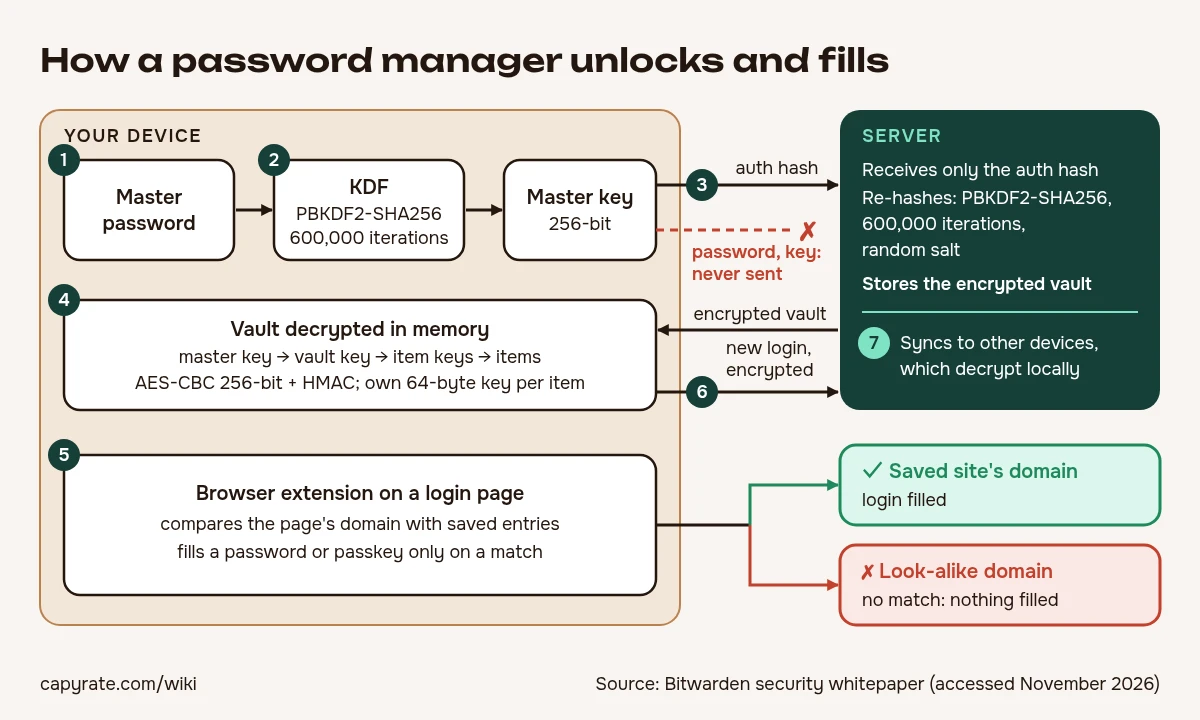 Keys are derived and used on your device. The server sees only a hash and ciphertext.
- Unlock. You enter the master password into the app or browser extension. Biometrics, where used, release a key already stored on the device.
- Key derivation. On your device, the client stretches the master password with a salt using a key derivation function (KDF). Bitwarden's default is PBKDF2-SHA256 with 600,000 iterations, salted with the account email, and Argon2id is optional. The result is a 256-bit master key, which Bitwarden expands with HKDF into a 512-bit stretched master key.
- Login without the password. The client sends the server only an authentication hash, never the password or the key. Bitwarden's server hashes it again with PBKDF2-SHA256 at 600,000 iterations and a random salt, then returns the encrypted vault.
- Decryption in memory. The master key decrypts the vault key, the vault key decrypts the per-item keys, and those decrypt the items. Bitwarden gives each item its own random 64-byte key and uses AES-CBC 256-bit with HMAC authentication (AES-256).
- Domain matching. On a login page, the extension compares the page's domain with your saved entries and offers to fill a username and password, or a passkey. If nothing matches, nothing is filled.
- Saving. A new login is encrypted on the device before it is uploaded.
- Sync. Your other devices download the encrypted item and decrypt it locally.
The KDF in step 2 sets how much each guess costs an attacker who has stolen an encrypted vault. More iterations, or a memory-hard function such as Argon2id, make offline cracking of a weak master password slower.
1Password variant. 1Password combines the account password with a 34-character Secret Key that has 128 bits of entropy and is never sent to 1Password. A memorised password averages about 40 bits of entropy, so the Secret Key is what stops a server breach on its own from being enough to brute-force vaults.
Local-file variant. KeePass 2.x keeps a single database file encrypted with AES-256 or ChaCha20, uses HMAC-SHA-256 in Encrypt-then-MAC mode, and derives keys with AES-KDF or Argon2 (Argon2d is recommended). Because encryption happens on the client, where you store the file makes no difference to security. You handle sync and backups yourself.
Password manager vs browser built-in vs passkeys vs SSO
| Tool | What it is | Where secrets live | Main limit |
|---|---|---|---|
| Third-party password manager | Generates, stores and fills passwords, passkeys, TOTP, cards and notes | Encrypted vault synced across operating systems and browsers | One more account to secure |
| Browser/OS built-in (Apple Passwords, Google Password Manager) | Same core job: generate, store, autofill | Tied to one ecosystem or account | Usually weaker cross-platform sync, sharing and admin controls |
| Passkeys | A credential: an asymmetric FIDO key pair that replaces a password | Inside a password manager or platform keychain | Only works on sites that support passkeys |
| Single sign-on (SSO) | One identity provider (e.g. Okta, Entra ID) logs you into federated apps | At the identity provider. Federated apps have no password of their own | Covers only federated apps |
| Authenticator app | Generates TOTP codes for a second factor | In the app | Not a password store |
| Spreadsheet or notes file | A list of credentials | Wherever the file sits | No generator, no autofill, no domain matching, no breach alerts |
| Secrets manager (HashiCorp Vault, AWS Secrets Manager) | Machine credentials such as API keys, fetched by applications through an API | Server-side, for software | Built for apps, not for people logging in |
Apple's Passwords app, announced with iOS 18 in June 2024, is built on Keychain and stores passwords, passkeys, Wi-Fi passwords and verification codes, with alerts for weak or leaked passwords. The NCSC considers saving passwords in the browser on your own devices low-risk, but never on shared or public devices. A built-in manager is enough if all your devices sit in one ecosystem and you don't need to share vaults across platforms.
Passkeys don't make the manager obsolete: the manager is one of the places passkeys are stored and synced, and it still holds passwords for sites without passkey support. Business plans often run SSO and a password manager side by side.
How safe are password managers? Real incidents and limits
LastPass, 2022. Attackers used data from an August 2022 breach of a development environment to copy cloud backups of customer vaults, which LastPass disclosed on 22 December 2022. The backups included names, emails, billing addresses, phone numbers and IP addresses. Website URLs inside the vaults were unencrypted. Usernames, passwords, secure notes and form data were AES-256 encrypted with a key derived from the master password.
The default at the time was 100,100 PBKDF2 iterations, and the 12-character master password minimum only applied from 2018, so older accounts could have weaker settings. In December 2025 the UK ICO fined LastPass £1.2 million (about $1.6M) over the breach, which affected up to 1.6 million UK users, finding it "failed to implement sufficiently robust technical and security measures."
Malicious-server attacks, 2026. Zero Knowledge (About) Encryption by Scarlata, Torrisi, Backendal and Paterson (ETH Zurich and USI, USENIX Security '26) studied Bitwarden, LastPass, Dashlane and 1Password, which together have more than 60M users and 23% market share. Assuming a fully malicious server, the authors found 31 attacks: 12 on Bitwarden, 7 on LastPass, 6 on Dashlane and 6 on 1Password. Severity ranged from integrity violations to the compromise of every vault in an organisation, and most allowed password recovery. As of February 2026, Bitwarden said all issues were resolved, Dashlane had shipped fixes starting with a 5 November 2025 release, and LastPass said some fixes were still in progress.
Extension clickjacking, 2025. At DEF CON 33 on 9 August 2025, Marek Tóth showed DOM-based extension clickjacking: invisible overlays trick you into clicking the extension's fill prompt and can leak credentials and TOTP codes. All 11 password manager extensions he tested were initially vulnerable to some form of it, so filling by hand with a click is not automatically safe.
Limits that stay. The vault is decrypted in memory on your device, so encryption does not protect you from malware that controls that device. The master password is a single point of failure, which is why CISA and the NCSC both say to put MFA on it.
None of this makes password reuse the better choice. One leaked reused password opens every account that shares it, while unique generated passwords limit the damage to one site.
What "zero-knowledge" does and doesn't guarantee
Zero-knowledge means the vendor never stores or receives your master password or any key material, only ciphertext and an authentication hash. If the server is breached, the attacker gets an encrypted vault that has to be cracked offline against your KDF settings.
What it doesn't guarantee:
- Metadata. Not every field is necessarily encrypted. LastPass's URLs show the list of sites you use can be readable. Check what the vendor says about URLs, item titles, folder names and icons.
- A hostile server. The cryptography can be sound and the client still be attacked by the server it trusts, the threat model behind the 31 attacks above.
- Recovery. The vendor can't reset what it never had. 1Password states it cannot recover a lost Secret Key: copies exist only in the Emergency Kit, in apps where you are signed in, and in encrypted device backups or keychains. Recovery generally relies on emergency kits, trusted-contact emergency access, or a device that is still unlocked.
How to check and harden your password manager
- KDF. Find the KDF in the vendor's whitepaper: PBKDF2-SHA256 at 600,000 or more iterations, or Argon2id. In Bitwarden or LastPass account settings, check your own account's iteration count. Old LastPass accounts may still be below the 100,100 default.
- Encrypted fields. Check whether the vendor documents which fields are encrypted, including URLs.
- Phishing test. Open a look-alike domain, or your login page on a different subdomain, and confirm the manager does not offer to fill. Check whether URL matching is set to the base domain or the exact host.
- Extension access. In Chrome, go to chrome://extensions → Details → Site access → "On click". Consider turning off autofill on page load, and keep the extension updated.
- Vault 2FA. Turn on two-step verification for the vault itself, ideally with a hardware key or passkey.
- Health report. Run the vault's health or breach report and replace reused or weak passwords.
- Recovery drill. Print or save the emergency kit or recovery code, set up emergency access, and confirm you can unlock the vault on a fresh device.
- Export test. Export to an encrypted file, or through CXF/CXP where supported, so you know you can leave. Delete any plaintext CSV afterwards.
How to choose a password manager
The NCSC's criteria: support for all your devices and operating systems, control over the length and character set of generated passwords, free vs paid, sharing, and breach notifications. Beyond those, check:
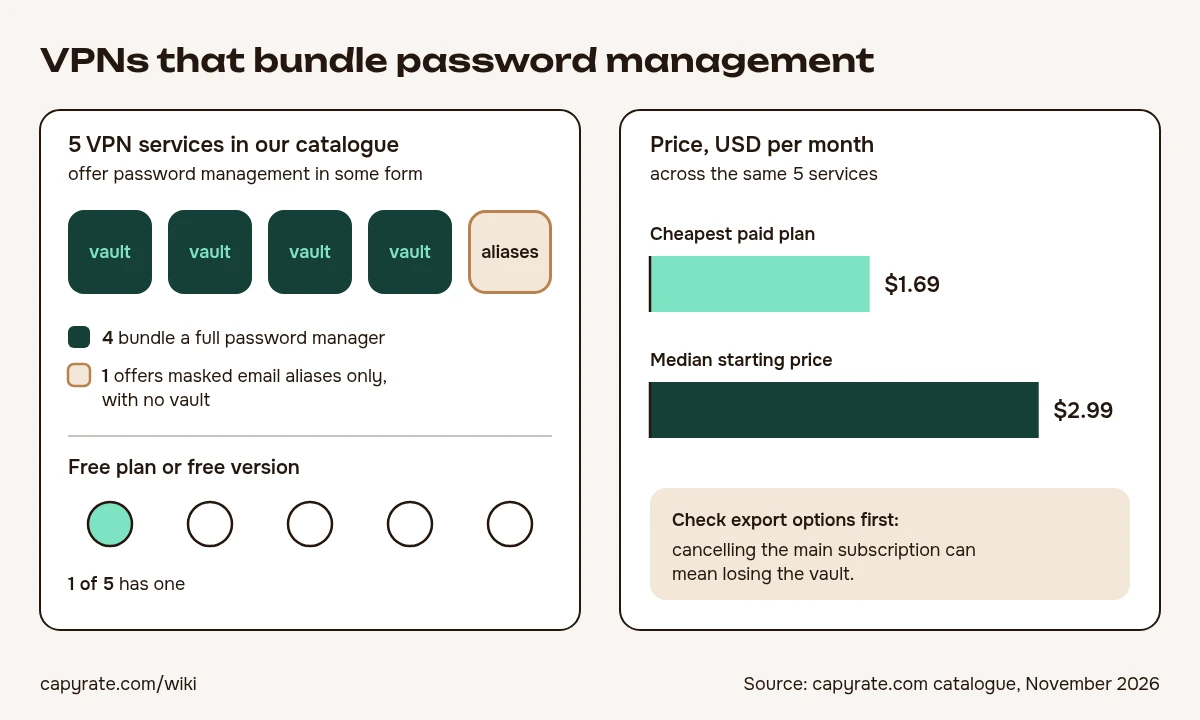 Password management bundled with VPNs in the capyrate.com catalogue, November 2026.
- whether the client code is open source (Bitwarden and KeePass are), and whether there are published independent audits, pentest reports and a bug bounty
- the KDF and its default settings
- which metadata fields are encrypted
- passkey storage and support for CXF/CXP export
- family plans, sharing and emergency access
- breach history and how openly the vendor disclosed it
Prices in USD, billed annually, as of November 2026:
| Plan | Bitwarden | 1Password |
|---|---|---|
| Free | $0 | None, trial only |
| Individual / Premium | $1.65/month ($19.80/year) | $3.99/month (was $2.99 until March 2026) |
| Families | $3.99/month, up to 6 users ($47.88/year) | $5.99/month (was $4.99 until March 2026) |
| Teams | $4 per user per month | Not listed |
| Enterprise | $6 per user per month | Not listed |
Given 1Password's March 2026 increase, confirm on the vendor's pricing page.
Managers also come bundled with other subscriptions. In our catalogue, 5 VPN services offer password management in some form: four bundle a full manager, and one offers only masked email aliases with no vault. One of the five has a free plan or free version. The cheapest paid plan among them is $1.69/month and the median starting price is $2.99/month. I'd check a bundled manager against the same checklist as a standalone one, especially the export options, because cancelling the main subscription can mean losing the vault.
Switching password managers and moving passkeys
A CSV export is the usual way out, and the riskiest: it writes every password to disk in plaintext. If you have to use one, import it straight away, then delete the file and empty the trash. An encrypted export is safer wherever both managers support it.
The FIDO Alliance Credential Exchange Format (CXF) v1.0 became a Proposed Standard on 14 August 2025, with errata published on 9 March 2026. It defines a JSON format for moving passwords, passkeys and other credentials between providers. The companion Credential Exchange Protocol (CXP) handles the encrypted transfer, so no plaintext file is needed. The spec's editors and contributors came from 1Password, Dashlane, Bitwarden, Google and NordPass, and Apple, Microsoft, Samsung, Okta and Enpass were also named in the announcement.
After the move, sign in to a few sites using passkeys from the new manager, run its health report, and set up vault 2FA and emergency access again. Close the old account only once everything works.
Tools that have it
From the directory, based on each tool's own feature list. Check the plan: some offer it only on paid tiers or certain apps.
- P
 Proton VPNProton Pass bundled in Proton Unlimited plan · Free, from $3.49/mo
- E
 ExpressVPNExpressVPN Keys password manager bundled with plans · From $2.99/mo
- N
 NordVPNNordPass included on Plus and higher plans · From $2.99/mo
- S
 SurfsharkAlternative ID masked emails, no full vault · From $2.49/mo
- P
 PureVPNBundled password manager in subscription · From $1.69/mo
FAQ
What happens if I forget my master password?
With a zero-knowledge manager the vendor cannot reset it, because it never stores or receives the password or key material. You get back in through an emergency kit or recovery code, trusted-contact emergency access, or a device that is still unlocked.
Is LastPass safe after the 2022 breach?
The stolen vault backups held encrypted passwords but unencrypted URLs, and older accounts could use fewer than 100,100 PBKDF2 iterations. If you stay, check your account's iteration count. If your master password was weak, change the passwords stored in the vault.
Is there a good free password manager?
Bitwarden has a $0 plan, and CISA counts the managers built into browsers as legitimate free options. 1Password has no free plan, only a trial.
Should I store 2FA (TOTP) codes in my password manager?
It's convenient, but your password and your second factor then sit in the same vault, so they are no longer two independent factors. For important accounts, keep TOTP in a separate authenticator app.
Is a local manager like KeePass safer than a cloud one?
KeePass encrypts its database file on the client with AES-256 or ChaCha20, so where you store the file doesn't affect security. The trade-off is that you handle sync and backups yourself, with no vendor server involved.
Can a password manager stop phishing?
Partly. It fills only on domains that match a saved entry, so a look-alike site gets nothing. You can still be fooled if you copy and paste the password in by hand.
Cite this page
You are welcome to quote this entry and reuse its pictures with a link to this page.
Vovchyk, S. (2026, November 7). Password Manager. capyrate Wiki. https://capyrate.com/wiki/password-manager<a href="https://capyrate.com/wiki/password-manager">Password Manager, capyrate Wiki</a>